What “Info needed” means for your claim
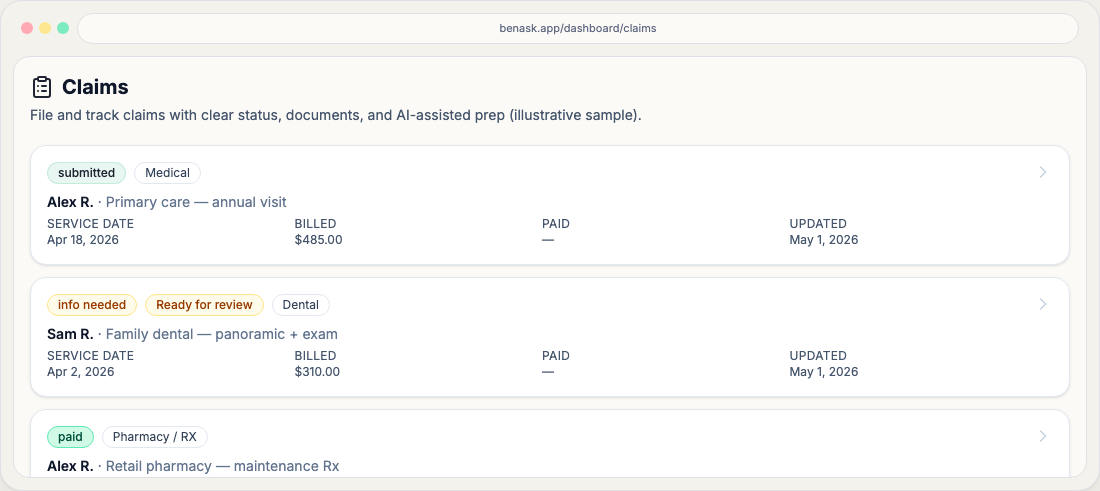
Info needed flags missing visit, billing, or document details—open the claim, fix gaps from prompts, then continue the wizard or Actions checklist.
When a claim shows Info needed on your dashboard, it reflects where that claim is in BenAsk’s filing checklist—not a guarantee of payment from your carrier. Your employer’s plan and the carrier remain the legal source of truth for benefits.
For the full member-filed claim path (decide → wizard → COB → submit → EOB → appeals), start with the Claims journey hub.
Where you see this status
Open Claims from the dashboard. Each claim has a workflow status chip that updates as you add documents, finish the wizard, and record payer outcomes from Actions.
What to do next
Something still blocks a clean handoff—often missing required documents from the playbook, extraction gaps, or fields that need your confirmation after LLM prefill.
- Open the claim and resolve prompts on **Overview**, **Documents**, and **Analysis**.
- Edit provider, date of service, amounts, or codes; re-attach a clearer scan if text extraction failed.
- Revisit coordination-of-benefits ordering using your plan materials and [COB overview](/help/learn/coordination-of-benefits) before resubmitting to a secondary payer.
FAQ
- Is this the same as my insurance claim status?
Often similar, but not always identical. BenAsk tracks your preparation and submission steps; carriers may use different labels in their portals.
- Can I change this status myself?
Some transitions happen when you complete steps in the app (for example, moving from draft to ready to submit). Others update when you record carrier outcomes.