How to load a benefits document
Upload guides, bills, and EOBs on Documents. Dental Care costs can extract a booklet without a full-guide analysis; pay the EOB you-owe, not the sticker.
BenAsk uses employer-provided benefits documents to ground plan context and comparisons. Upload PDFs from your secure employer portal when available—never share someone else’s coverage details without permission.
Steps
- Open Documents
From the dashboard, go to Documents at
/dashboard/documents. The hub opens on Bills & claims (or Everything if you have no bills yet). Use Benefits & plans for enrollment guides. Family chips above the list filter by household member (labels, not slugs). - Choose upload or capture
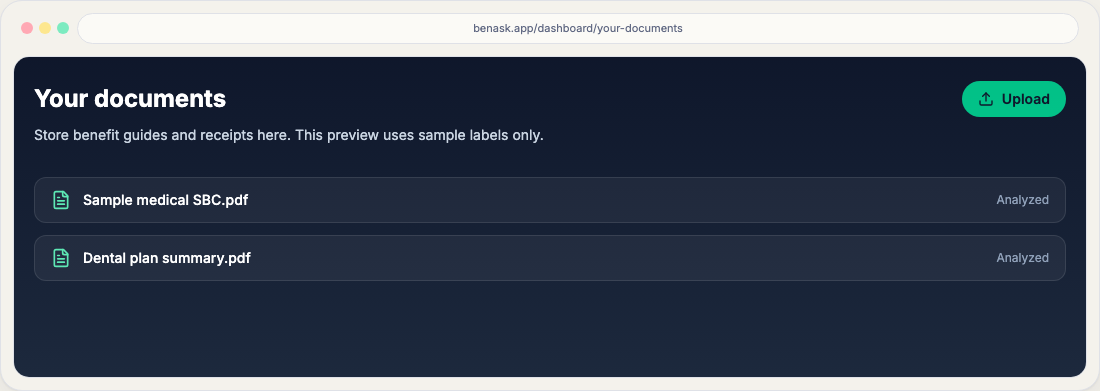
Upload Documents is its own card above Your Documents. It starts collapsed—click the heading to expand and drag files in. On phone or tablet, use Take photo on that card. Use Advanced search next to the lens tabs to filter by scope, type, member, plan, or dates. Filtering by family member or search shows a spinner in the middle of the list until results return. Files group into care folders (Needs attention, Bills & EOBs, Prescriptions, Results, Referrals, Claims, Benefits & plans, Other). Folders start collapsed except Needs attention; Show more reveals extra rows. Compact rows use View and a ⋯ menu (rename, type, member, reanalyze, chat, remove). On a phone the title wraps on its own line; only urgent chips stay on the collapsed row.
- Wait for processing
Large files may take a minute — the row shows an Analyzing… chip and a soft pulse until it finishes. Choosing Reanalyze from the ⋯ menu uses that same in-progress look (the green Analyzed label switches to Analyzing…). If parsing fails, try a smaller export or a text-based PDF. Flag unclear pages for review rather than guessing values. For dental or vision coverage search, Care costs can also read a certificate or Covered Services Guide without sending the whole stacked PDF through the expensive full-guide analyzer.
After analysis
When analysis finishes, BenAsk fills an empty title, short description, and plan type from the document (for example, an EOB or bill is marked medical). The original filename stays in smaller parentheses when it differs from the title. Provider prefers the facility or organization name—not a redacted person token. Matched plans prefer medical coverage for EOBs and bills so lifestyle or mental-health programs are not attached by a weak name match.
Use View document on a row to open the file itself (a short-lived download). Open View summary for a plain-language overview you can share with family. Chat uses a separate internal note so follow-up questions stay accurate without showing analyst-style copy in the library.
For medical bills and EOBs with CPT or HCPCS codes, BenAsk compares the billed amount to public in-network rates for your enrolled medical plan and your remaining deductible. If the gap would change what you pay, the row lands in Needs attention with a May affect what you pay badge, and Inbox can include See typical rates (Care costs). Dental CDT codes (for example D2740 crown) do not use that medical rate file. Care costs shows class coinsurance, frequency, and annual max from your booklet—or opens Find booklet if none is on file. Inbox then links Add booklet instead of typical dollars. When the allowed or plan-paid amount is missing on an EOB, the summary asks you to confirm those lines rather than treating the billed charge as what you owe. Missing public medical rates do not create an Inbox item.
Matching bills, EOBs, and visits
After analysis, compact rows can show Linked (auto or confirmed same claim), Possible match (you confirm or dismiss), Visit (same day and facility, different billing entities—for example a hospital bill and a professional bill), and Paid when a payment confirmation is linked. These chips stay visible on a phone. Expand a row to see related files, This visit, and confirm or dismiss a possible match. Matching is a Visit chip, not a separate Visit folder.
Inbox can remind you when a bill is due soon, when an EOB says you owe a different amount than the bill’s sticker price (pay the EOB you-owe amount, not the chargemaster), and when a visit may need a surprise-billing review. A Draft message in Inbox or Chat seeds a letter you copy and send yourself—BenAsk does not mail or fax it.
AI document analyses count toward your plan (Free: 5 lifetime; Platinum: 40/month; Platinum Plus: 150/month shared with household). Medical bills, chat attachments, inbound email/Telegram files, and Reanalyze count. Onboarding and benefits-guide extracts do not. See file uploads and limits and Pricing.
Privacy
See our Privacy Policy for retention, AI disclosures, and consumer health data rights.
FAQ
- Can BenAsk guarantee my benefits?
No. BenAsk summarizes and organizes information; your plan documents and carrier are authoritative.
- What if OCR misreads a table?
Correct values in the app when prompted, or contact support with a clean PDF export.
- Why does the list title differ from the filename?
After analysis, BenAsk may add a short title (payer, document type, and month). The original filename stays in parentheses so you can still find the file.
- How is the document list organized?
Documents sit in care folders such as Bills & EOBs, Results (including lab results), and Needs attention. Family chips filter by household member. Linked, Possible match, Visit, and Paid chips sit on the row (including on a phone). Use the row ⋯ menu for type, member, summary, and chat.
- What is Possible match versus Linked?
Linked means BenAsk auto-matched or you confirmed the same claim (bill + EOB). Possible match is a weaker pair—expand the row to confirm or dismiss. A Visit chip groups different bills from the same facility and day; that is not the same as one claim cluster.
- Why is a bill in Needs attention with “May affect what you pay”?
BenAsk compared the billed amount to typical in-network rates using your plan type and remaining deductible. That badge appears only when estimated member cost would change—not when the extra billed charge is mainly a write-off between the provider and the insurer.
- Does uploading a benefits guide count against my AI analysis allowance?
No. Onboarding and benefits-guide extracts are included. Medical files, chat attachments, inbound uploads, and Reanalyze count toward the 5 / 40 / 150 AI analysis limits. See file uploads and limits.
- How do I add a dental or vision booklet for Care costs?
Open Care costs, search a service such as crown or cleaning, and use Find booklet. You can open the carrier’s forms page, upload a PDF, reuse a certificate already on Documents, or type class coinsurance and the annual max. BenAsk indexes the Covered Services pages without sending a stacked 600-page PDF through the full-guide analyzer. Newly found categories (for example accident) are not auto-enrolled.